
API 요청
/rest/hide_rrn요청 파라미터 2개 · 필수 2
imagetype- 예시
3
응답 필드 파일
정상 응답은 파일 본문입니다. 실패 시 JSON 오류가 올 수 있으므로 HTTP 상태와 Content-Type을 먼저 확인하세요.
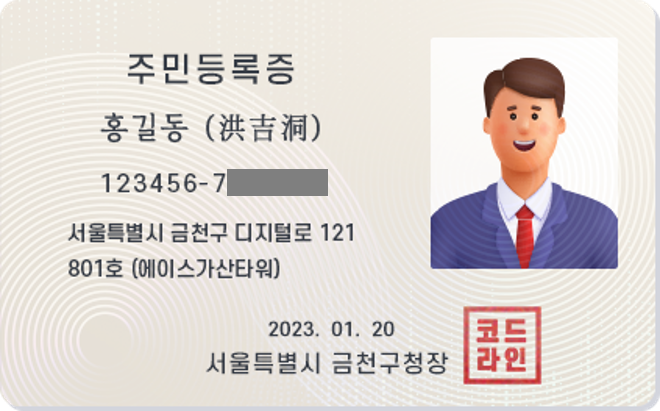
이미지파일에서 주민등록번호를 인식하여 가립니다.
https://apick.app/rest/hide_rrn왜 개인정보 마스킹(주민등록번호)인가
고객이 올린 서류 이미지에 주민등록번호가 그대로 남아 있으면 유출 한 번에 과징금과 신뢰를 함께 잃습니다. 이미지만 보내면 번호를 찾아 가린 사본을 돌려줘 원본 노출 걱정을 끝냅니다.
REQUEST_TOO_LARGE 오류가 반환되며 과금되지 않습니다.
type)으로 가린 PNG 이미지를 바로 돌려줍니다.
신분증 사본·등본·계약서 사진을 보관하거나 다른 담당자에게 전달하기 전에 주민등록번호를 가릴 때 사용합니다.
가린 이미지와 함께 성명·생년월일 같은 항목 값도 필요하면 신분증 종류별 개인정보 마스킹 API(/rest/identity_document_id_card 등)를 사용하세요.
/rest/hide_rrnimagetype3정상 응답은 파일 본문입니다. 실패 시 JSON 오류가 올 수 있으므로 HTTP 상태와 Content-Type을 먼저 확인하세요.
상황별로 보내는 값과 응답에서 확인할 값을 모았습니다. 언어 탭에서 그대로 복사해 쓸 수 있습니다.
보관용 사본에서 성별 자리만 남기고 주민등록번호 뒷자리 6자리를 가립니다.
/rest/hide_rrncurl --fail-with-body --request POST 'https://apick.app/rest/hide_rrn' \
--header "Authorization: Bearer $APICK_API_KEY" \
--form 'image=@./id_card.jpg' \
--form-string 'type=3' \
--dump-header response.headers --output result.bin
# response.headers의 Content-Type을 확인한 뒤 파일을 사용하세요.import { readFile } from "node:fs/promises";
const form = new FormData();
form.append("image", new Blob([await readFile("./id_card.jpg")]), "id_card.jpg");
form.append("type", "3");
const response = await fetch("https://apick.app/rest/hide_rrn", {
method: "POST",
headers: { Authorization: "Bearer " + process.env.APICK_API_KEY },
body: form,
signal: AbortSignal.timeout(120_000),
});
if (!response.ok) throw new Error(`HTTP ${response.status}: ${await response.text()}`);
if ((response.headers.get("content-type") || "").includes("json")) {
throw new Error(JSON.stringify(await response.json()));
}
const { writeFile } = await import("node:fs/promises");
await writeFile("result.bin", new Uint8Array(await response.arrayBuffer()));import os
import requests
parts = [
("image", ("id_card.jpg", open("./id_card.jpg", "rb"))),
("type", (None, "3")),
]
response = requests.request("POST", "https://apick.app/rest/hide_rrn",
headers={"Authorization": "Bearer " + os.environ["APICK_API_KEY"]},
files=parts,
timeout=(10, 120), stream=True)
response.raise_for_status()
if "json" in response.headers.get("Content-Type", ""):
raise RuntimeError(response.json())
with open("result.bin", "wb") as output:
for chunk in response.iter_content(65536):
output.write(chunk)<?php
$headers = ["Authorization: Bearer " . getenv("APICK_API_KEY")];
$form = [
'image' => new CURLFile('./id_card.jpg'),
'type' => '3',
];
$curl = curl_init('https://apick.app/rest/hide_rrn');
curl_setopt_array($curl, [
CURLOPT_CUSTOMREQUEST => 'POST',
CURLOPT_HTTPHEADER => $headers,
CURLOPT_POSTFIELDS => $form,
CURLOPT_RETURNTRANSFER => true,
CURLOPT_CONNECTTIMEOUT => 10, CURLOPT_TIMEOUT => 120,
]);
$body = curl_exec($curl);
if ($body === false) { throw new RuntimeException(curl_error($curl)); }
$status = curl_getinfo($curl, CURLINFO_HTTP_CODE);
$type = curl_getinfo($curl, CURLINFO_CONTENT_TYPE) ?: "";
curl_close($curl);
if ($status >= 400) { throw new RuntimeException($body); }
if (strpos($type, "json") !== false) { throw new RuntimeException($body); }
file_put_contents('result.bin', $body);Content-Type이 image/png이면 본문을 그대로 .png 파일로 저장합니다.Content-Type이 JSON이면 실패이므로 data.error와 data.error_code를 확인합니다.등본·계약서 사진처럼 주소도 남기면 안 되는 문서는 type=4로 주민등록번호와 주소를 함께 가립니다.
/rest/hide_rrncurl --fail-with-body --request POST 'https://apick.app/rest/hide_rrn' \
--header "Authorization: Bearer $APICK_API_KEY" \
--form 'image=@./contract.jpg' \
--form-string 'type=4' \
--dump-header response.headers --output result.bin
# response.headers의 Content-Type을 확인한 뒤 파일을 사용하세요.import { readFile } from "node:fs/promises";
const form = new FormData();
form.append("image", new Blob([await readFile("./contract.jpg")]), "contract.jpg");
form.append("type", "4");
const response = await fetch("https://apick.app/rest/hide_rrn", {
method: "POST",
headers: { Authorization: "Bearer " + process.env.APICK_API_KEY },
body: form,
signal: AbortSignal.timeout(120_000),
});
if (!response.ok) throw new Error(`HTTP ${response.status}: ${await response.text()}`);
if ((response.headers.get("content-type") || "").includes("json")) {
throw new Error(JSON.stringify(await response.json()));
}
const { writeFile } = await import("node:fs/promises");
await writeFile("result.bin", new Uint8Array(await response.arrayBuffer()));import os
import requests
parts = [
("image", ("contract.jpg", open("./contract.jpg", "rb"))),
("type", (None, "4")),
]
response = requests.request("POST", "https://apick.app/rest/hide_rrn",
headers={"Authorization": "Bearer " + os.environ["APICK_API_KEY"]},
files=parts,
timeout=(10, 120), stream=True)
response.raise_for_status()
if "json" in response.headers.get("Content-Type", ""):
raise RuntimeError(response.json())
with open("result.bin", "wb") as output:
for chunk in response.iter_content(65536):
output.write(chunk)<?php
$headers = ["Authorization: Bearer " . getenv("APICK_API_KEY")];
$form = [
'image' => new CURLFile('./contract.jpg'),
'type' => '4',
];
$curl = curl_init('https://apick.app/rest/hide_rrn');
curl_setopt_array($curl, [
CURLOPT_CUSTOMREQUEST => 'POST',
CURLOPT_HTTPHEADER => $headers,
CURLOPT_POSTFIELDS => $form,
CURLOPT_RETURNTRANSFER => true,
CURLOPT_CONNECTTIMEOUT => 10, CURLOPT_TIMEOUT => 120,
]);
$body = curl_exec($curl);
if ($body === false) { throw new RuntimeException(curl_error($curl)); }
$status = curl_getinfo($curl, CURLINFO_HTTP_CODE);
$type = curl_getinfo($curl, CURLINFO_CONTENT_TYPE) ?: "";
curl_close($curl);
if ($status >= 400) { throw new RuntimeException($body); }
if (strpos($type, "json") !== false) { throw new RuntimeException($body); }
file_put_contents('result.bin', $body);data.error_code가 IDENTITY_TEXT_UNREADABLE(HTTP 422)이면 번호가 선명하게 보이는 이미지로 다시 보냅니다.IDENTITY_DOCUMENT_MISMATCH(HTTP 400)이면 주민등록번호가 없는 이미지입니다.외부 공유용 이미지처럼 생년월일도 보이면 안 될 때는 type=1로 13자리 전체를 가립니다.
/rest/hide_rrncurl --fail-with-body --request POST 'https://apick.app/rest/hide_rrn' \
--header "Authorization: Bearer $APICK_API_KEY" \
--form 'image=@./id_card.png' \
--form-string 'type=1' \
--dump-header response.headers --output result.bin
# response.headers의 Content-Type을 확인한 뒤 파일을 사용하세요.import { readFile } from "node:fs/promises";
const form = new FormData();
form.append("image", new Blob([await readFile("./id_card.png")]), "id_card.png");
form.append("type", "1");
const response = await fetch("https://apick.app/rest/hide_rrn", {
method: "POST",
headers: { Authorization: "Bearer " + process.env.APICK_API_KEY },
body: form,
signal: AbortSignal.timeout(120_000),
});
if (!response.ok) throw new Error(`HTTP ${response.status}: ${await response.text()}`);
if ((response.headers.get("content-type") || "").includes("json")) {
throw new Error(JSON.stringify(await response.json()));
}
const { writeFile } = await import("node:fs/promises");
await writeFile("result.bin", new Uint8Array(await response.arrayBuffer()));import os
import requests
parts = [
("image", ("id_card.png", open("./id_card.png", "rb"))),
("type", (None, "1")),
]
response = requests.request("POST", "https://apick.app/rest/hide_rrn",
headers={"Authorization": "Bearer " + os.environ["APICK_API_KEY"]},
files=parts,
timeout=(10, 120), stream=True)
response.raise_for_status()
if "json" in response.headers.get("Content-Type", ""):
raise RuntimeError(response.json())
with open("result.bin", "wb") as output:
for chunk in response.iter_content(65536):
output.write(chunk)<?php
$headers = ["Authorization: Bearer " . getenv("APICK_API_KEY")];
$form = [
'image' => new CURLFile('./id_card.png'),
'type' => '1',
];
$curl = curl_init('https://apick.app/rest/hide_rrn');
curl_setopt_array($curl, [
CURLOPT_CUSTOMREQUEST => 'POST',
CURLOPT_HTTPHEADER => $headers,
CURLOPT_POSTFIELDS => $form,
CURLOPT_RETURNTRANSFER => true,
CURLOPT_CONNECTTIMEOUT => 10, CURLOPT_TIMEOUT => 120,
]);
$body = curl_exec($curl);
if ($body === false) { throw new RuntimeException(curl_error($curl)); }
$status = curl_getinfo($curl, CURLINFO_HTTP_CODE);
$type = curl_getinfo($curl, CURLINFO_CONTENT_TYPE) ?: "";
curl_close($curl);
if ($status >= 400) { throw new RuntimeException($body); }
if (strpos($type, "json") !== false) { throw new RuntimeException($body); }
file_put_contents('result.bin', $body);data.error가 "필수 입력값이 없습니다."(HTTP 400)이면 type이 1~4인지 확인합니다.HTTP 성공과 업무 결과를 구분하세요. 경로별 응답 필드와 예시는 위 요청과 응답에 함께 있습니다.
image/png입니다. 실패하면 JSON이므로 이 값으로 성공 여부를 먼저 구분하세요.attachment; filename=output.png입니다.data.error가 담긴 JSON이 옵니다.응답을 아래 순서로 확인하세요. 결과 유무와 과금 여부는 서로 다릅니다.
type이 없거나 1~4가 아닙니다.image 항목에 파일 본문이 첨부되지 않았습니다. multipart/form-data로 파일을 첨부했는지 확인하세요.실패 응답은 data.success: 0, api.cost: 0을 유지하며 data.error_code로 원인을 구분합니다.
FORM_DATA_INVALIDFORM_DATA_FIELD_CONFLICTMULTIPART_LIMIT_OR_PARSE_ERROR실제 차감 금액은 응답의 api.cost로 확인하세요. 상세 요금은 요금정책에서 볼 수 있습니다.
(성공) Content-Type: image/png 인 PNG 바이너리
같은 요청을 JavaScript와 Python으로 옮긴 예시입니다. 키는 환경변수 APICK_API_KEY 에서 읽습니다.